Plugins
Plugins
LightlyStudio offers the possibility to extend its functionality by using plugins. Users can define their own plugins or use pre-defined ones.
The LightlyStudio operator plugin makes it possible to call a python function in the backend through a dialog in the graphical user interface (GUI) alias frontend. After you register an operator through the Python API, the GUI lists it automatically. For operators using the builtin parameter types, the dialog in the GUI is generated and rendered automatically.
Operator Plugin
An operator plugin is defined by the following attributes of the BaseOperator schema:
- name: The name of the operator that will also be used in the GUI.
- description: A detailed description of what the operator does.
- parameters: A list of inputs exposed in the GUI. Supported parameter types are documented under
Parameter - supported_scopes: A list of
OperatorScopesthe operator can be executed in. - execute: The method that is used to execute the actual action. It will receive the parameters from the GUI.
Hello World
An example `Hello World" operator plugin looks like this:
from dataclasses import dataclass

from lightly_studio.plugins.base_operator import BaseOperator, OperatorResult
from lightly_studio.plugins.operator_context import OperatorScope
from lightly_studio.plugins.parameter import StringParameter


@dataclass
class GreetingOperator(BaseOperator):
    name: str = "GreetingOperator"
    description: str = "This operator greet you"

    @property
    def parameters(self):
        return [
            StringParameter(
                name="name",
                required=True,
                default="beautiful and smart person",
                description="your name"
            ),
        ]

    @property
    def supported_scopes(self) -> list[OperatorScope]:
        """Return the list of scopes this operator can be triggered from."""
        return [OperatorScope.ROOT]

    def execute(self, *, session, context, parameters):
        your_name = parameters.get("name", "")
        return OperatorResult(success=True, message=f"Hello {your_name}!")
To make an operator known to the application, you have to register it. For this you need to extend our main execution .py file:
import lightly_studio as ls
from lightly_studio.plugins.operator_registry import operator_registry
from lightly_studio.utils import download_example_dataset
from greeting_operator import GreetingOperator

dataset_path = download_example_dataset(download_dir="dataset_examples")

dataset = ls.ImageDataset.create()
dataset.add_images_from_path(path=f"{dataset_path}/coco_subset_128_images/images")

# Register the operator to make it available to the application
operator_registry.register(GreetingOperator())

ls.start_gui()
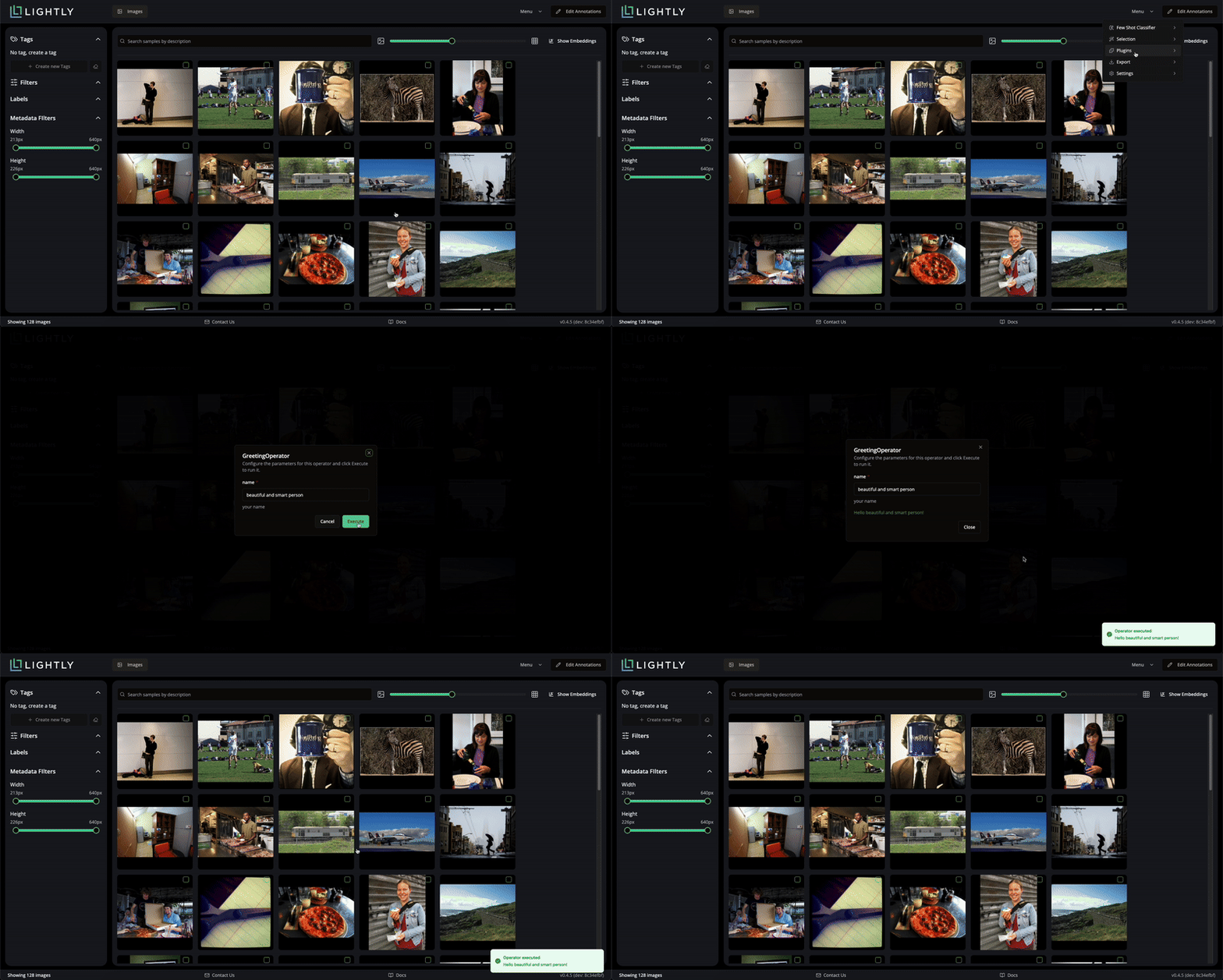
After launching the GUI, the new plugin appears in the menu at the top-right corner.
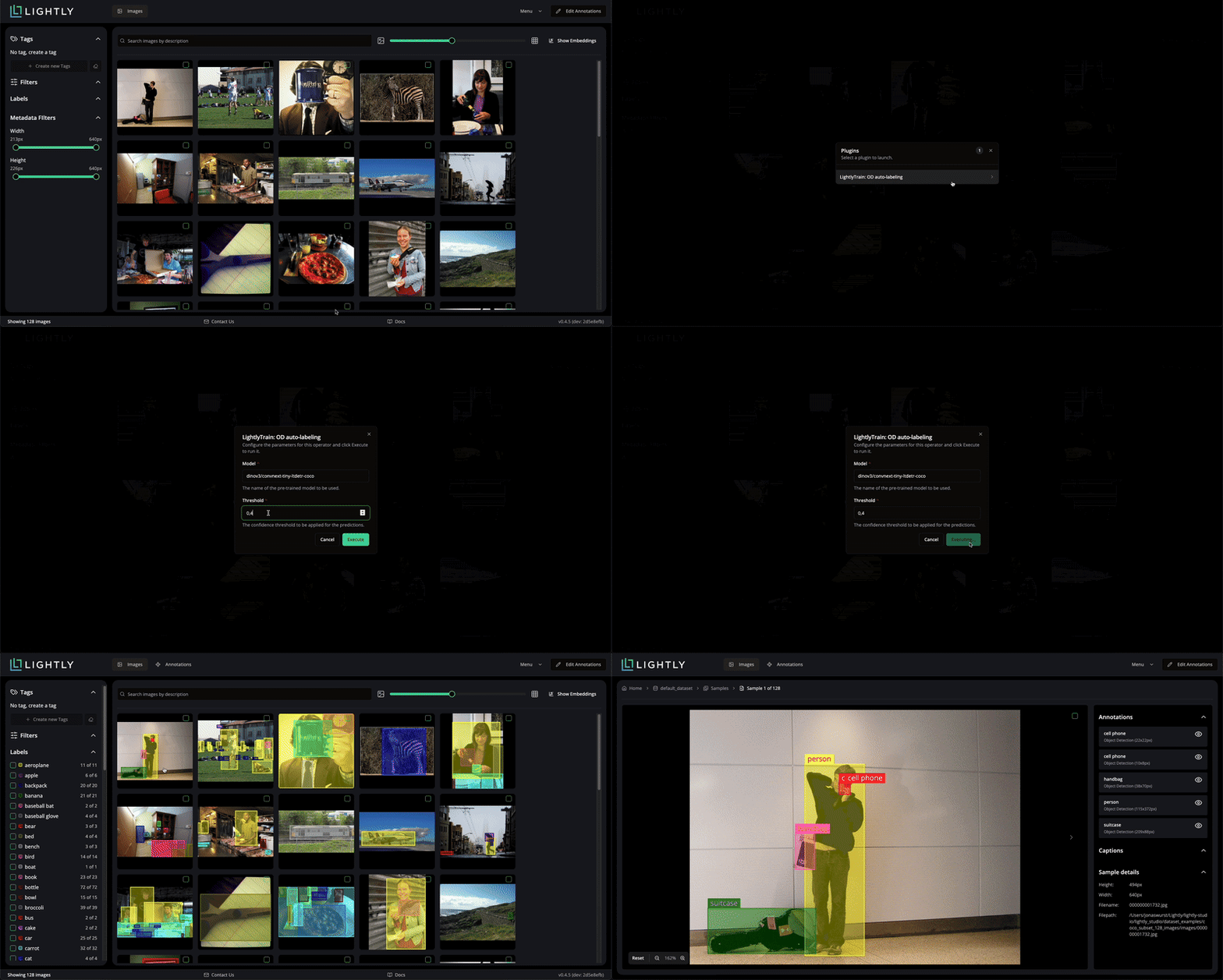
LightlyTrain Object Detection
In this example we create an auto-labeling operator plugin powered by LightlyTrain, so make sure lightly-train is installed via pip install lightly-train. Compared to the Hello World example, this operator plugin introduces two inputs: the model name and the confidence threshold used for predictions. These parameters let you choose a pre-trained LightlyTrain model and control how confident detections must be before they are written back to LightlyStudio.
from dataclasses import dataclass

import lightly_train
from PIL import Image
from lightly_train._commands.predict_task_helpers import prepare_coco_entries as prepare_entries

from lightly_studio.models.annotation.annotation_base import AnnotationCreate, AnnotationType
from lightly_studio.models.annotation_label import AnnotationLabelCreate
from lightly_studio.plugins.base_operator import BaseOperator, OperatorResult
from lightly_studio.plugins.operator_context import OperatorScope
from lightly_studio.plugins.parameter import FloatParameter, StringParameter
from lightly_studio.resolvers.image_filter import ImageFilter
from lightly_studio.resolvers import annotation_label_resolver, annotation_resolver, image_resolver
from lightly_studio.resolvers.sample_resolver.sample_filter import SampleFilter


def _preload_label_map(session, dataset_id, class_names):
    """Pre-creates all necessary labels in the DB and returns a lookup map.

    Args:
        session: Database session.
        class_names: List of class names the model supports (e.g. ['car', 'person']).

    Returns:
        A dictionary mapping label names to their DB UUIDs.
    """
    label_map = {}

    for name in class_names:
        # Check if label exists in db
        label = annotation_label_resolver.get_by_label_name(session=session, dataset_id=dataset_id, label_name=name)

        # Create if missing
        if label is None:
            label_create = AnnotationLabelCreate(dataset_id=dataset_id, annotation_label_name=name)
            label = annotation_label_resolver.create(session=session, label=label_create)

        label_map[name] = label.annotation_label_id

    return label_map

@dataclass
class LightlyTrainAutoLabelingODOperator(BaseOperator):
    name: str = "LightlyTrain: OD auto-labeling"
    description: str = "This plugin allows to use pre-trained LightlyTrain models to perform auto-labeling for Object Detection."

    @property
    def parameters(self):
        return [
            StringParameter(
                name="Model",
                required=True,
                description="The name of the pre-trained model to be used.",
                default="dinov3/convnext-tiny-ltdetr-coco"
            ),
            FloatParameter(
                name="Threshold",
                default=0.4,
                description="The confidence threshold to be applied to the predictions."
            ),
        ]

    @property
    def supported_scopes(self) -> list[OperatorScope]:
        """Return the list of scopes this operator can be triggered from."""
        return [OperatorScope.IMAGE]

    def execute(self, *, session, context, parameters):
        try:
            model = lightly_train.load_model(parameters["Model"])
        except ValueError as e:
            return OperatorResult(success=False, message=f"Model load failed: {str(e)}")

        if (parameters["Threshold"] > 1.0) or (parameters["Threshold"] < 0.0):
            return OperatorResult(success=False, message="Threshold must be in range 0.0 to 1.0")

        raw_classes = getattr(model, "classes", {})
        label_map = _preload_label_map(session, context.collection_id, list(raw_classes.values()))

        # Getting all samples for the provided context
        context_filter = None
        if context.context_filter:
            if isinstance(context.context_filter, SampleFilter):
                context_filter = ImageFilter(sample_filter=context.context_filter)
            elif isinstance(context.context_filter, ImageFilter):
                context_filter = context.context_filter

        samples = image_resolver.get_all_by_collection_id(
            session=session,
            collection_id=context.collection_id,
            filters=context_filter
        )

        # Running inference
        annotations_buffer = []
        for sample in samples.samples:
            image = Image.open(sample.file_path_abs).convert("RGB")

            preds = model.predict(image, threshold=parameters["Threshold"])
            entries = prepare_entries(predictions=preds, image_size=(sample.width, sample.height))

            for entry in entries:
                annotations_buffer.append(
                    AnnotationCreate(
                        parent_sample_id=sample.sample_id,
                        annotation_label_id=label_map[raw_classes[entry["category_id"]]],
                        annotation_type=AnnotationType.OBJECT_DETECTION,
                        x=int(entry["bbox"][0]),
                        y=int(entry["bbox"][1]),
                        width=int(entry["bbox"][2]),
                        height=int(entry["bbox"][3]),
                        confidence=entry["score"],
                    )
                )

        annotation_resolver.create_many(
            session=session,
            parent_collection_id=context.collection_id,
            annotations=annotations_buffer,
        )
        total_created = len(annotations_buffer)

        return OperatorResult(
            success=True, message=f"Auto-labeling complete. Added {total_created} annotations."
        )
import lightly_studio as ls
from lightly_studio.plugins.operator_registry import operator_registry
from lightly_studio.utils import download_example_dataset
from lightly_train_auto_label_od_operator import LightlyTrainAutoLabelingODOperator

dataset_path = download_example_dataset(download_dir="dataset_examples")

dataset = ls.ImageDataset.create()
dataset.add_images_from_path(path=f"{dataset_path}/coco_subset_128_images/images")

# Register the operator to make it available to the application
operator_registry.register(LightlyTrainAutoLabelingODOperator())

ls.start_gui()