Search and Filter
Search helps you find visually or semantically similar samples from a text or image. Filters narrow down the samples currently shown in the view by tags, labels, dimensions, and other numeric metadata. Use the GUI for similarity search and quick filtering. Use DatasetQuery in Python when you need reusable filtering, sorting, and slicing in code.
Search in GUI
Use the search bar above the grid to find similar samples in one of these ways:
- Type a text query.
- Paste an image from your clipboard into the search bar. You can e.g. right-click an image in your browser and select
Copy image, then click the search bar and paste it withCtrl+VorCmd+V. - Click the image button to upload an image.
Then submit the search by hitting Enter. The number shown on each search result is its similarity score to the current query. Click the x button to remove the search query.
The screen recording below shows the search both by text query "dog" and by pasting an image.
Search requires embeddings
Search is available only when embeddings were generated during data loading.
Filter in GUI
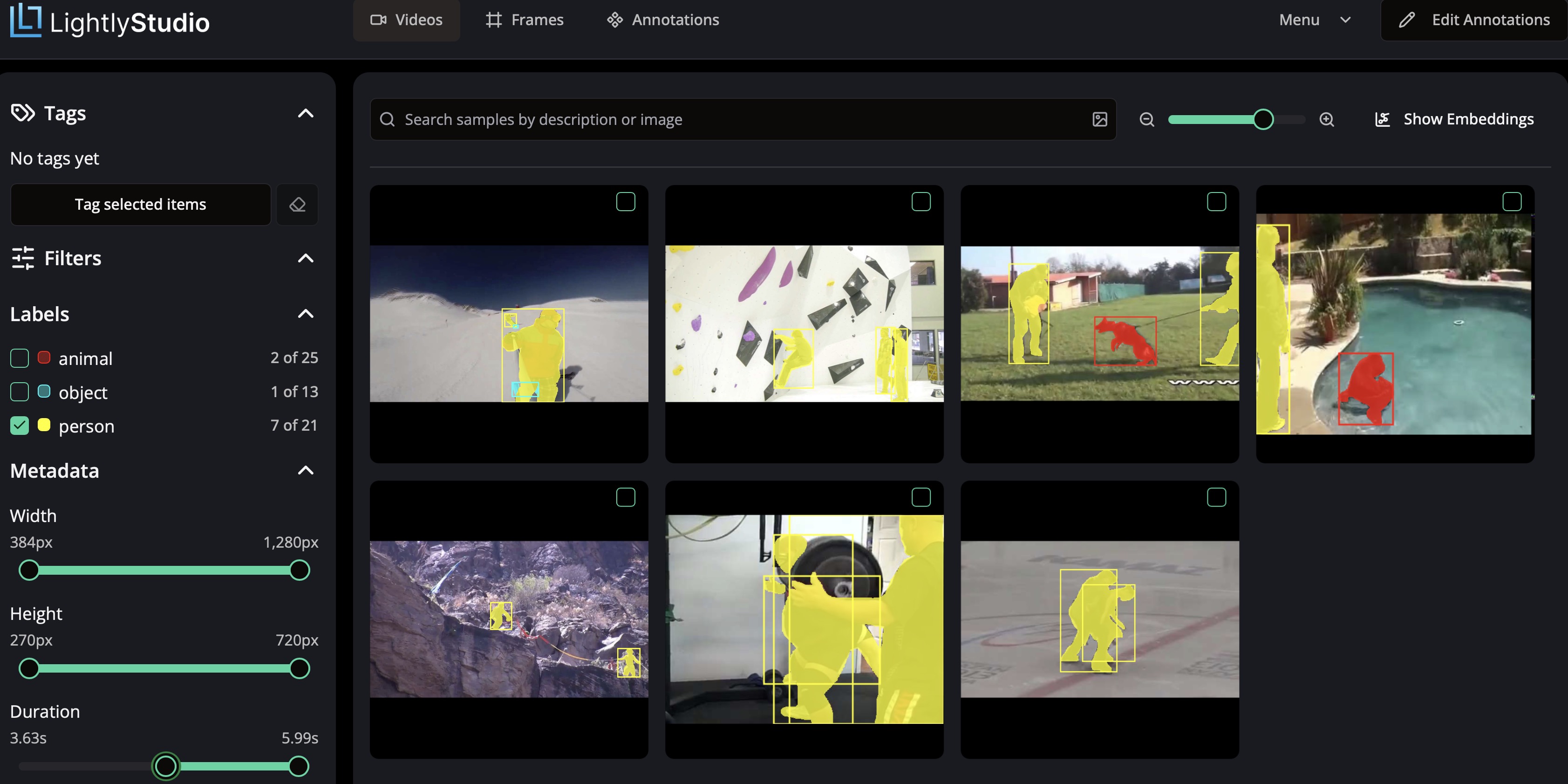
The left sidebar combines the most common ways to narrow down the visible samples:
Tags: Click one or more tags to focus on the subset you care about, such aslabeledorunlabeled.Labels: Click one or more labels to show items with those annotations.Dimensions: UseWidthandHeightto constrain the visible item size.Metadata: If numeric metadata fields are available, they appear as additional sliders in the same area.

For videos, the sidebar adds Duration. If the videos in the current view contain varying frame rates, it also shows FPS.
Query in Python
You can programmatically filter samples by attributes (e.g., image size, tags), sort them, and select subsets. This is useful for creating training/validation splits, finding specific samples, or exporting filtered data.
Create a query object by combining match, order_by and slice (or [start:end]) calls. The query is composed lazily and executed against the database once it is consumed, e.g. by iterating over it or calling add_tag.
The example below uses the ImageSampleField for demonstration, for video datasets, use VideoSampleField instead.
from lightly_studio.core.dataset_query import AND, OR, NOT, OrderByField, ImageSampleField

# QUERY: Define a lazy query, composed by: match, order_by, slice
# match: Find all samples that need labeling plus small samples (< 500px) that haven't been reviewed.
# For video datasets: use VideoSampleField instead of ImageSampleField.
query = dataset.match(
    OR(
        AND(
            ImageSampleField.width < 500,
            NOT(ImageSampleField.tags.contains("reviewed"))
        ),
        ImageSampleField.tags.contains("needs-labeling")
    )
)

# order_by: Sort the samples by their width descending.
query.order_by(
    OrderByField(ImageSampleField.width).desc()
)

# slice: Extract a slice of samples.
query[10:20]

# chaining: The query can also be constructed in chained way
query = dataset.match(...).order_by(...)[...]

# Ways to consume the query
# Tag this subset for easy filtering in the UI.
query.add_tag("needs-review")

# Iterate over resulting samples
for sample in query:
    # Access sample attributes such as tags, file_name, or metadata

# Collect all resulting samples as list
samples = query.to_list()

# Export all resulting samples in coco format
dataset.export(query).to_coco_object_detections()
# For video datasets: export in a video format
# dataset.export(query).to_youtube_vis_instance_segmentation()
Reference
The following sections explain the available methods for defining a query in more detail.
They use the ImageSampleField for demonstration, but the same applies to VideoSampleField for video datasets.
You can define query filters with:
query.match(<expression>)
ImageSampleField.<field_name> <operator> <value> syntax can be used. Available field names can be seen in ImageSampleField.
from lightly_studio.core.dataset_query import ImageSampleField

# Ordinal fields: <, <=, >, >=, ==, !=
expr = ImageSampleField.height >= 10            # All samples with images that are taller than 9 pixels
expr = ImageSampleField.width == 10             # All samples with images that are exactly 10 pixels wide
expr = ImageSampleField.created_at > datetime   # All samples created after datetime (actual datetime object)

# String fields: ==, !=
expr = ImageSampleField.file_name == "some"     # All samples with "some" as file name
expr = ImageSampleField.file_path_abs != "other" # All samples that are not having "other" as file_path

# Tags: contains()
expr = ImageSampleField.tags.contains("dog")    # All samples that contain the tag "dog"

# Assign any of the previous expressions to a query:
query.match(expr)
The filtering on individual fields can flexibly be combined to create more complex match expression. For this, the boolean operators AND, OR, and NOT are available. Boolean operators can arbitrarily be nested.
from lightly_studio.core.dataset_query import AND, OR, NOT, ImageSampleField

# All samples with images that are between 10 and 20 pixels wide
expr = AND(
    ImageSampleField.width > 10,
    ImageSampleField.width < 20
)

# All samples with file names that are either "a" or "b"
expr = OR(
    ImageSampleField.file_name == "a",
    ImageSampleField.file_name == "b"
)

# All samples which do not contain a tag "dog"
expr = NOT(ImageSampleField.tags.contains("dog"))

# All samples for a nested expression
expr = OR(
    ImageSampleField.file_name == "a",
    ImageSampleField.file_name == "b",
    AND(
        ImageSampleField.width > 10,
        ImageSampleField.width < 20,
        NOT(
            ImageSampleField.tags.contains("dog")
        ),
    ),
)

# Assign any of the previous expressions to a query:
query.match(expr)
Setting the sorting of a query can be done by
query.order_by(<expression>)
The order expression can be defined by OrderByField(ImageSampleField.<field_name>).<order_direction>().
from lightly_studio.core.dataset_query import OrderByField, ImageSampleField

# Sort the query by the width of the image in ascending order
expr = OrderByField(ImageSampleField.width)
expr = OrderByField(ImageSampleField.width).asc()

# Sort the query by the file name in descending order
expr = OrderByField(ImageSampleField.file_name).desc()

# Assign any of the previous expressions to a query:
query.order_by(expr)
Setting the slicing of a query can be done by:
query.slice(<offset>, <limit>)
# OR
query[<offset>:<stop>]
# Slice 2:5
query.slice(offset=2, limit=3)
query[2:5]

# Slice :5
query.slice(limit=5)
query[:5]

# Slice 5:
query.slice(offset=5)
query[5:]
For more details, see the API reference of DatasetQuery.