Embeddings
An embedding is a vector of numbers that captures the visual content of a sample, generated by a machine learning model like e.g. CLIP. Samples that look alike get vectors that are close together, so distance in embedding space is a measure of visual similarity.
Embeddings are the shared foundation under three features in LightlyStudio: search, the embedding plot, and every embedding-based sampling strategy. You do not run anything to get them. LightlyStudio computes embeddings automatically when you add data.
How Embeddings Are Created
LightlyStudio embeds each sample when you add it to a dataset with all loading functions,
for example with add_images_from_path for an image dataset or
add_videos_from_path for a video dataset.
To skip embedding, pass embed=False to the add method. This is faster, but it
disables search and the embedding plot for those samples. For videos this skips
only the whole-video embedding; frames are still embedded unless you also pass
embed_frames=False (see below).
Embeddings are stored in the database and reused when you reopen the dataset. Only new samples are embedded. See Reuse Datasets.
Beyond whole images and videos, LightlyStudio embeds two more levels of your data.
Video frame embeddings
For a video dataset, LightlyStudio embeds each video as a whole and also embeds the
extracted frames as images. Each frame gets its own embedding, stored alongside the
frame. Frame embeddings are on by default; pass embed_frames=False to
add_videos_from_path to skip them.
Object-level embeddings
LightlyStudio embeds each object (an object-detection box or segmentation mask) as
its own crop. This unlocks the embedding plot and similarity search on individual
objects, the same way they work for whole images. Browse objects in the Annotations
view of the GUI.
Object embeddings are on by default; the add_annotations_from_* methods accept
embed_annotations=False to skip them.
Editing an annotation does not update its embedding
An object keeps the embedding of its original crop. If you move or resize a box, LightlyStudio does not recompute its embedding. Support for this is planned.
Built-in Embedding Models
LightlyStudio ships with two embedding models:
- MobileCLIP (
mobileclip_s0, 512 dimensions) embeds anything treated as an image: images, video frames, and object crops. - Perception Encoder (
PE-Core-T16-384) embeds videos.
The Embedding Plot (GUI)
Click the Embed button in the top right of the GUI to open the embedding plot. It
shows your samples as points in a 2D projection of embedding space (projected with PaCMAP).
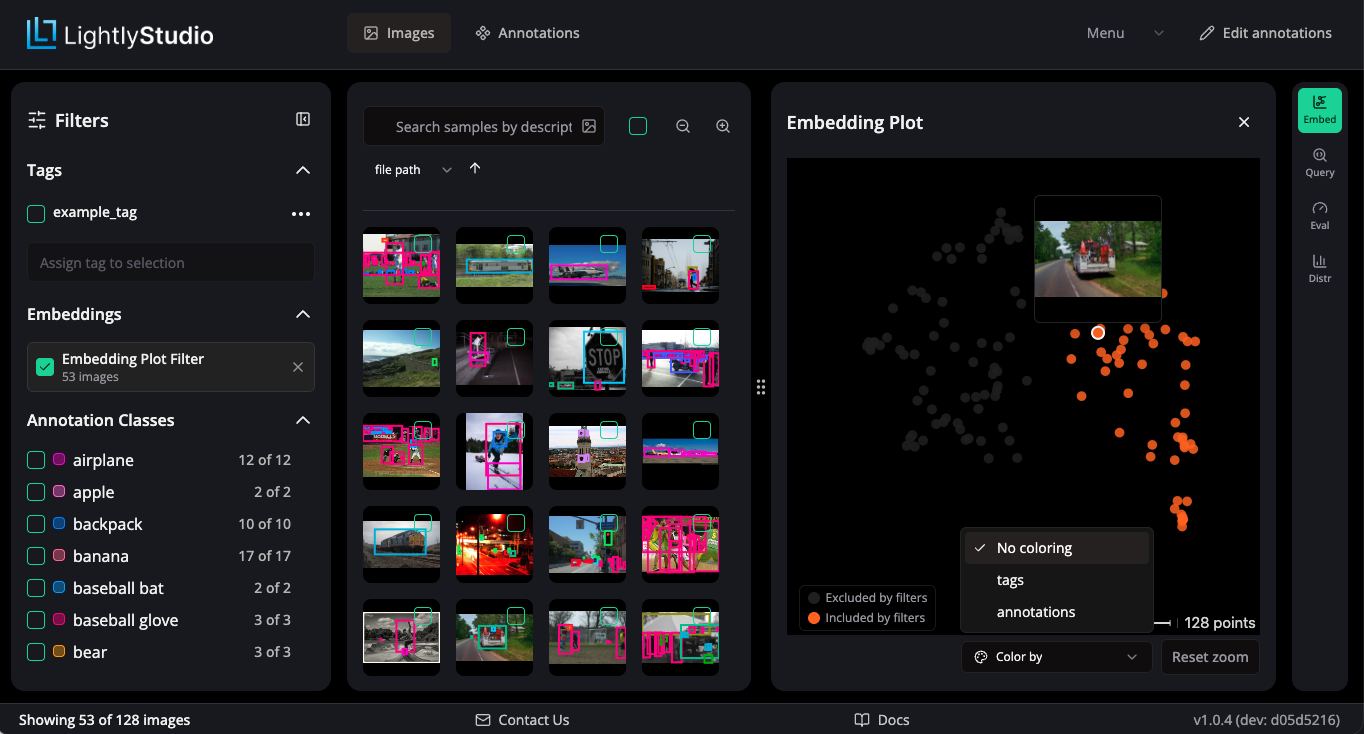
You can:
- Color the points by tag, annotation class, or metadata (text and true/false
fields) using the
Color bypopover. - Hover a point to preview its thumbnail.
- Lasso a region to scope the grid to the samples in that part of the plot, and show or hide the points that your current filters exclude.
- Double-click a legend entry to isolate that category, so only its points stay visible. Single-click to toggle a category visibility.
What Embeddings Power
- Similarity search by text or image. See Search and Filter.
- Sampling strategies such as diverse, deduplication, similarity, and typicality/outliers. See Sampling.
Using Your Own Embeddings
Beta API
The embeddings API is in beta. Its interface may change in future releases without a deprecation period.
You may want to replace the built-in models — for example to use a domain-specific model, or to reuse vectors you already computed in another pipeline.
Both cases use the same mechanism: e.g. for images, implement the ImageEmbeddingGenerator
protocol and register it with ls.set_default_embedding_model(...) before you add to
a dataset or launch the GUI. The only difference is what your implementation of embed_images
does inside.
| Use-case | What embed_images does |
Example |
|---|---|---|
| Compute embeddings on the fly | Runs your model on the given file paths | example_custom_embedding_model.py |
| Load precomputed embeddings | Looks up stored vectors by file path | example_load_existing_embeddings.py |
Implement these protocol methods based on your needs. The API reference gives the full method signatures:
EmbeddingGenerator(base):get_embedding_model_inputto describe the model to the database.embed_textto override the text search model.
ImageEmbeddingGenerator:embed_imagesto override the image embedding model.embed_image_cropsto override the model for embedding annotations.embed_pil_imagesto override the model to embed video frames.
VideoEmbeddingGenerator:embed_videosto override the video embedding model.
ImageEmbeddingGenerator and VideoEmbeddingGenerator both extend the base protocol.
If you don't need an embedding method raise the NotImplementedError exception.
Examples below show how an override is done for ImageEmbeddingGenerator.
Some methods also run while the GUI is open
LightlyStudio calls your generator at two points: when you add data, and while the
GUI is open to answer search queries. If a method raises NotImplementedError,
its search feature is not available in the GUI.
Loading precomputed embeddings
Use this when you already have vectors — from a previous run, an external pipeline,
or a research model. Instead of running a model, embed_images looks up each file
path in your store.
embed_images(filepaths) returns an EmbeddingResult(embeddings, kept_indices).
Return a matrix with one row for each file path you have a vector for, and use kept_indices
to list which input positions those rows belong to. This lets you skip any file path
that has no vector.
from uuid import UUID

import numpy as np
from numpy.typing import NDArray
from PIL import Image

import lightly_studio as ls
from lightly_studio.dataset.embedding_result import EmbeddingResult
from lightly_studio.models.embedding_model import EmbeddingModelCreate

EMBEDDING_DIMENSION = 512


class CustomEmbeddingsGenerator(ls.ImageEmbeddingGenerator):
    def __init__(self) -> None:
        self._filepath_to_embedding: dict[str, NDArray[np.float32]] = ...  # Implement the loading logic here.

    def get_embedding_model_input(self, collection_id: UUID) -> EmbeddingModelCreate: ...

    def embed_text(self, text: str) -> list[float]: ...

    def embed_image_crops(
        self, image_crops: list[ls.ImageCrop], show_progress: bool = True
    ) -> EmbeddingResult: ...

    def embed_pil_images(
        self, images: list[Image.Image], show_progress: bool = True
    ) -> NDArray[np.float32]: ...

    def embed_images(
        self, filepaths: list[str], show_progress: bool = True
    ) -> EmbeddingResult:
        rows: list[NDArray[np.float32]] = []
        kept_indices: list[int] = []
        for index, filepath in enumerate(filepaths):
            embedding = self._filepath_to_embedding.get(filepath)
            if embedding is None:
                continue  # No vector for this path, so skip it.
            rows.append(embedding)
            kept_indices.append(index)
        embeddings = (
            np.stack(rows).astype(np.float32)
            if rows
            else np.empty((0, EMBEDDING_DIMENSION), dtype=np.float32)
        )
        return EmbeddingResult(embeddings=embeddings, kept_indices=kept_indices)


ls.set_default_embedding_model(CustomEmbeddingsGenerator())
For the full runnable version, including how to key vectors by the absolute path that
the backend stores, see
example_load_existing_embeddings.py.
Computing embeddings on the fly
Use this when you want a different model than the built-ins. Load your model in
__init__ and run it inside embed_images.
from uuid import UUID

import numpy as np
from numpy.typing import NDArray
from PIL import Image

import lightly_studio as ls
from lightly_studio.dataset.embedding_result import EmbeddingResult
from lightly_studio.models.embedding_model import EmbeddingModelCreate

EMBEDDING_DIMENSION = 512


class CustomEmbeddingGenerator(ls.ImageEmbeddingGenerator):
    def __init__(self) -> None:
        ...  # Load your model and preprocessing here.

    def get_embedding_model_input(self, collection_id: UUID) -> EmbeddingModelCreate: ...

    def embed_text(self, text: str) -> list[float]: ...

    def embed_image_crops(
        self, image_crops: list[ls.ImageCrop], show_progress: bool = True
    ) -> EmbeddingResult: ...

    def embed_pil_images(
        self, images: list[Image.Image], show_progress: bool = True
    ) -> NDArray[np.float32]: ...

    def embed_images(
        self, filepaths: list[str], show_progress: bool = True
    ) -> EmbeddingResult:
        kept_indices: list[int] = []
        vectors: list[NDArray[np.float32]] = []
        for index, filepath in enumerate(filepaths):
            image = self._load(filepath)  # Skip a file you cannot read.
            if image is None:
                continue
            vectors.append(self._model.encode(image))
            kept_indices.append(index)
        embeddings = (
            np.stack(vectors).astype(np.float32)
            if vectors
            else np.empty((0, EMBEDDING_DIMENSION), dtype=np.float32)
        )
        return EmbeddingResult(embeddings=embeddings, kept_indices=kept_indices)


ls.set_default_embedding_model(CustomEmbeddingGenerator())
For the full runnable version, which wraps MobileCLIP and also implements
embed_text, embed_image_crops, and embed_pil_images, see
example_custom_embedding_model.py.
Text search needs a shared text encoder
For the text search to return meaningful results, your image and text encoder must share the same embedding space.