Collaboration and Permissions
LightlyStudio lets your team work on the same datasets together. Each member has a role that controls what they can do.
Inviting Teammates
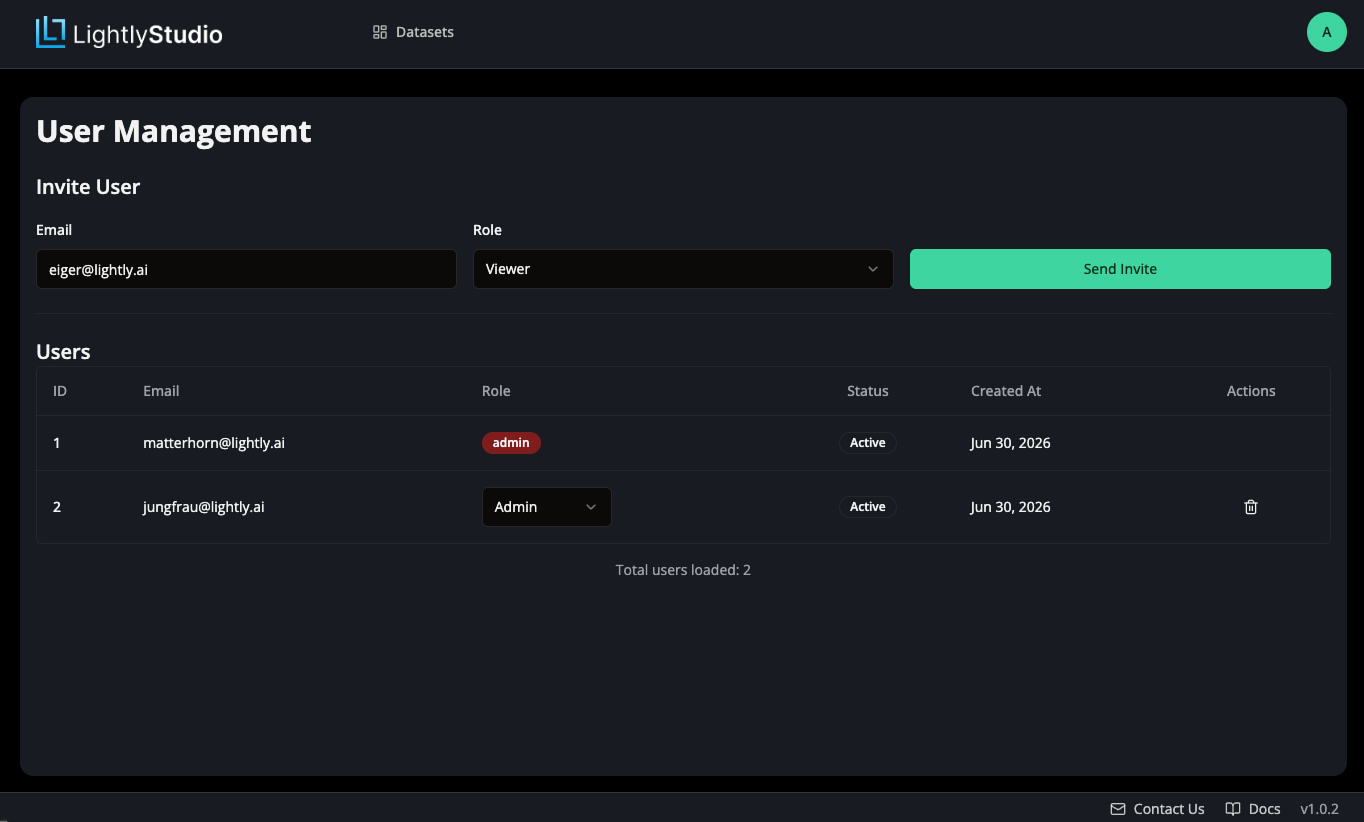
Admins invite teammates and assign each of them a role on the Users page under
Workspace → Users. An admin can change a member's role at any time.
Roles
- Viewer: explore and export data without changing it.
- Labeler: create tags and edit annotations.
- Editor: everything a labeler can do, plus configure the workspace.
- Admin: everything an editor can do, plus manage members and their roles.
Permissions
| Capability | Viewer | Labeler | Editor | Admin |
|---|---|---|---|---|
| View data, tags, and annotations | ✔ | ✔ | ✔ | ✔ |
| Export data | ✔ | ✔ | ✔ | ✔ |
| Create and apply tags | ✗ | ✔ | ✔ | ✔ |
| Edit annotations and labels | ✗ | ✔ | ✔ | ✔ |
| Few-Shot Classifier, Sampling, Plugins, and Settings | ✗ | ✗ | ✔ | ✔ |
| Manage users and roles | ✗ | ✗ | ✗ | ✔ |
