Plugins
LightlyStudio offers the possibility to extend its functionality by using plugins. Users can define their own plugins or use pre-defined ones.
LightlyStudio plugins can add workflows such as image segmentation with SAM3, auto-labeling for object detection, zero-shot image classification, image captioning with a vision-language model, and video plugins for tasks like bounding box propagation across frames. This makes it possible to extend LightlyStudio with model-assisted annotation and dataset-specific automation directly inside the UI.
Plugins are shown in the UI based on their scope. The scope tells LightlyStudio which modality and context a plugin supports, for example dataset-level, image, or video frame context. The current view then determines which items the plugin runs on: in grid view, it uses the items matching the active filters; in detail view, it runs on the currently open item.
How Plugins Are Registered
LightlyStudio registers a plugin in one of two ways:
| Mode | Use it for | What you do |
|---|---|---|
| Automatic discovery | Plugins installed as a Python package, such as the LightlyStudio plugins | Install the package. LightlyStudio registers it when the GUI starts. |
| Manual registration | Your own operator that is not packaged, for example a class in a local script | Call operator_registry.register(...) before ls.start_gui(). |
Do not register an installed plugin by hand. It then shows up twice in the GUI.
LightlyStudio Plugins
Ready-to-use plugins are available in the lightly-studio-plugins repository. Each plugin lives in its own subdirectory under plugins/ and can be installed directly from the repository.
Available Plugins
-
BBox auto propagation nano tracker
Propagates boxes from one annotated video frame to other frames in the same video.Details
If triggered from a frame, all bounding box annotations on that frame are propagated. If triggered from an annotation, only the selected annotation is propagated.
- Scope: video only, within a single video
- Entry points: frame or annotation
- Controls: forward and backward propagation windows in seconds
- Tradeoff: uses OpenCV NanoTracker, which is lightweight and fast on many machines but less robust on difficult motion, occlusion, or scale changes
- Maintainer: Lightly
- Install:
pip install git+https://github.com/lightly-ai/lightly-studio-plugins.git#subdirectory=plugins/bbox_auto_propagation_nano_tracker/
-
SAM3
Segments all instances matching a table of text prompts in a single image or across the current view.Details
This is designed for dataset-wide prompt-based labeling workflows with class-like prompts such as
person,car, ordog. All prompts run in one pass of the model.- Scope: single image or images in the current view
- Input: a table of text prompts, each with an optional annotation class name
in the
labelcolumn - Output: segmentation masks, or only bounding boxes if you select
bounding_boxes_only - Annotation classes: taken from the
labelcolumn. Iflabelis empty, the prompt text is the annotation class name. Rows with the samelabelgive one annotation class, for examplecarandtruckboth asvehicle - Requirement: Hugging Face access to
facebook/sam3 - Maintainer: Lightly
- Install:
pip install git+https://github.com/lightly-ai/lightly-studio-plugins.git#subdirectory=plugins/sam3_segmentation/
-
Zero-Shot Classification
Classifies samples against a table of text prompts, with no training.Details
You define the annotation classes in the GUI as rows of
promptandlabel. The plugin scores each sample against every prompt. The sample gets the annotation class of the best match. The plugin uses the embeddings that LightlyStudio already computed for the collection, so it loads no vision model.- Scope: images, videos, or video frames in the current view
- Input: a table of at least two text prompts, each with an optional
annotation class name in the
labelcolumn - Output: classification annotations, at most one per sample
- Annotation classes: taken from the
labelcolumn. Iflabelis empty, the prompt text is the annotation class name - Requirement: embeddings for the collection. LightlyStudio computes them on ingestion. Samples without an embedding are skipped
- Tip: every sample gets the closest prompt. Add a catch-all row such as
a photo of something elsefor samples that match no class - Maintainer: Lightly
- Install:
pip install git+https://github.com/lightly-ai/lightly-studio-plugins.git#subdirectory=plugins/zero_shot_classification/
-
LightlyTrain object detection inference
Runs LightlyTrain object detection inference on one image or the current view for auto-labeling.Details
You can use built-in LightlyTrain models for quick bootstrapping or provide a path to your own LightlyTrain checkpoint.
- Scope: single image or images in the current view
- Input: LightlyTrain model name or local path to a LightlyTrain checkpoint
- Output: object detection annotations
- Annotation classes: annotation classes are read from the loaded model and created in the dataset if they do not exist yet
- Recommended models:
dinov3/convnext-large-ltdetr-cocofor best performance,dinov3/vits16-ltdetr-cocofor a speed/quality balance,picodet-l-cocofor resource-constrained environments - Maintainer: Lightly
- Install:
pip install git+https://github.com/lightly-ai/lightly-studio-plugins.git#subdirectory=plugins/lightly_train_object_detection_inference/
-
OpenRouter image captioning
Captions a single image or the current view with a vision model served through OpenRouter.Details
The plugin uses the OpenAI-compatible API of OpenRouter. You can use any vision-capable model on OpenRouter. Change the
modelparameter to select a different model.- Scope: single image or images in the current view
- Input: OpenRouter model name and prompt
- Output: LightlyStudio captions. New captions are added next to the existing captions
- Default model:
qwen/qwen3-vl-8b-instruct. Any vision-capable model from openrouter.ai/models works - Requirement: an OpenRouter API key from
openrouter.ai/keys. Enter it in the
api_keyfield, or set theOPENROUTER_API_KEYenvironment variable before you start LightlyStudio. A.envfile in the start directory also works - Tradeoff: each run calls a paid API and blocks until it finishes. Filter the view before you caption
- Maintainer: Lightly
- Install:
pip install git+https://github.com/lightly-ai/lightly-studio-plugins.git#subdirectory=plugins/openrouter_image_captioning/
Explore all available plugins on GitHub →
Install LightlyStudio Plugins
Replace <plugin_name> with the folder name of the plugin you want to install:
pip install "git+https://github.com/lightly-ai/lightly-studio-plugins.git#subdirectory=plugins/<plugin_name>/"
Once installed, the plugin is registered automatically the next time you start the GUI.
You do not need to call operator_registry.register. If the GUI is already running,
restart it.
To remove a plugin, uninstall its package with pip uninstall,
using the package name defined in the plugin's pyproject.toml (typically matching the
plugin folder name).
Example: LightlyStudio SAM3 Plugin
The sam3_segmentation plugin brings interactive, model-assisted segmentation to
LightlyStudio using Segment Anything Model 3 (SAM3). Install it with:
pip install "git+https://github.com/lightly-ai/lightly-studio-plugins.git#subdirectory=plugins/sam3_segmentation/"
Prerequisites
This plugin requires access to the SAM3 model on Hugging Face. Read the sam3_segmentation README before installing to make sure you have the necessary access and dependencies set up.
Once installed, the SAM3 plugin appears in the operator menu. To use it:
- Select an image, or filter the grid view to a set of images.
- Open the SAM3 plugin.
- Add one row per prompt to the
promptstable. Optionally, set the annotation class name in thelabelcolumn. - To store only bounding boxes, select
bounding_boxes_only. - Run the plugin.
SAM3 creates a segmentation mask or a bounding box for each instance that matches a prompt. Each annotation gets the annotation class of its row.
Build Your Own Plugin
An operator plugin lets you run backend code from a dialog in the LightlyStudio GUI. You write a subclass of BaseOperator and put the action in its execute method. After you register an operator, the GUI lists it automatically. While you develop an operator, register it manually in your script (see below). To share it, package it with a lightly_studio.plugins entry point so LightlyStudio discovers it on install. See Contributing Plugins. For operators that use the built-in parameter types, the GUI generates and renders the dialog automatically.
Operator Plugin
An operator plugin is defined by the following attributes of the BaseOperator schema:
- name: The name of the operator that will also be used in the GUI.
- description: A detailed description of what the operator does.
- parameters: A list of inputs exposed in the GUI. Supported parameter types are documented under
Parameter - supported_scopes: A list of
OperatorScopevalues that determine where the operator should appear in the GUI. In most cases, you will use one of these: ROOTfor dataset-level operatorsIMAGEfor image collectionsVIDEO_FRAMEfor video frame collections- execute: The method that is used to execute the actual action. It will receive the parameters from the GUI.
Hello World
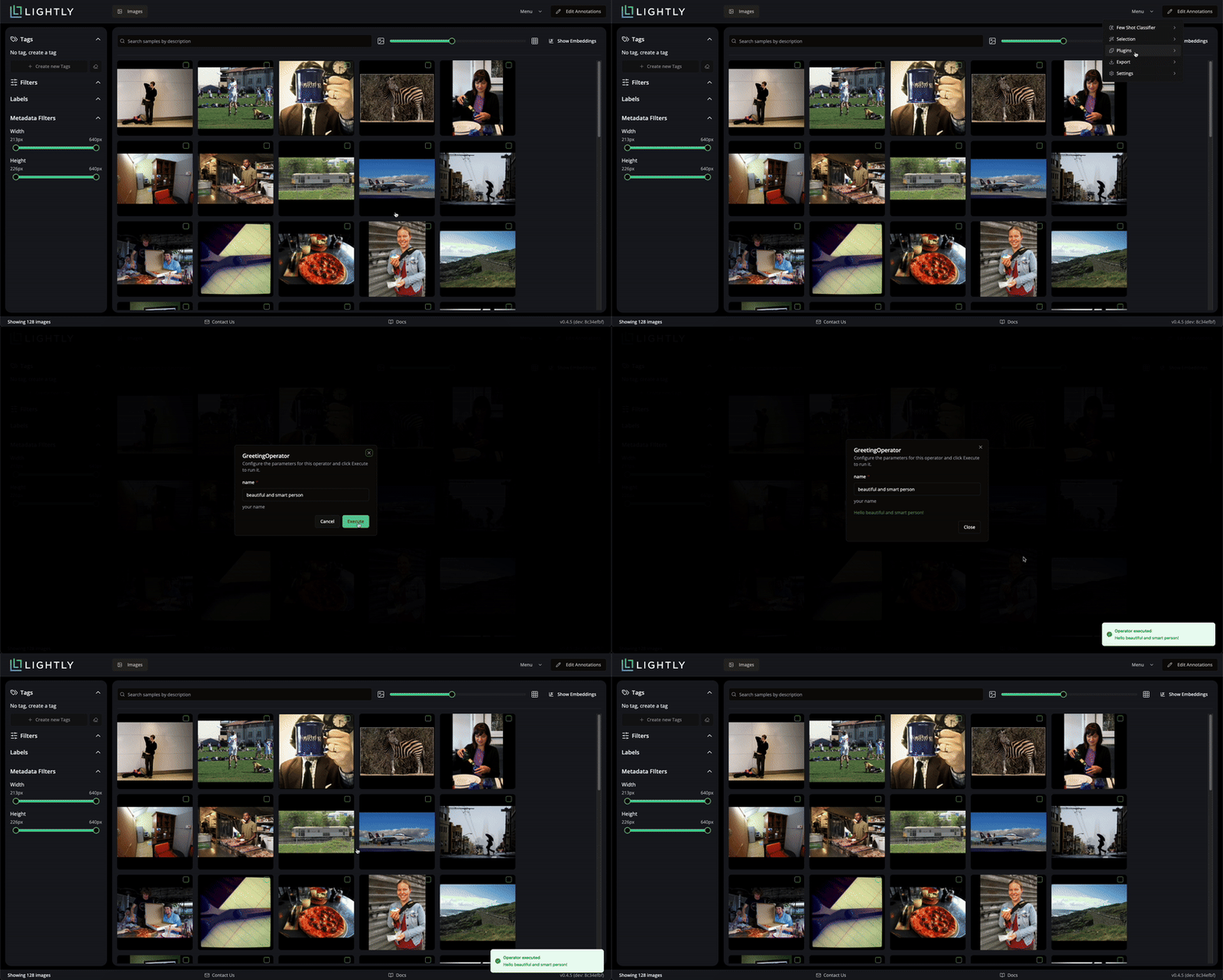
An example `Hello World" operator plugin looks like this:
from dataclasses import dataclass

from lightly_studio.plugins.base_operator import BaseOperator, OperatorResult
from lightly_studio.plugins.operator_context import OperatorScope
from lightly_studio.plugins.parameter import StringParameter


@dataclass
class GreetingOperator(BaseOperator):
    name: str = "GreetingOperator"
    description: str = "This operator greet you"

    @property
    def parameters(self):
        return [
            StringParameter(
                name="name",
                required=True,
                default="beautiful and smart person",
                description="your name"
            ),
        ]

    @property
    def supported_scopes(self) -> list[OperatorScope]:
        """Return the list of scopes this operator can be triggered from."""
        return [OperatorScope.ROOT]

    def execute(self, *, session, context, parameters):
        your_name = parameters.get("name", "")
        return OperatorResult(success=True, message=f"Hello {your_name}!")
To make an operator known to the application, you register it manually (see How Plugins Are Registered). For this you need to extend our main execution .py file:
import lightly_studio as ls
from lightly_studio.plugins.operator_registry import operator_registry
from lightly_studio.utils import download_example_dataset
from greeting_operator import GreetingOperator

dataset_path = download_example_dataset(download_dir="dataset_examples")

dataset = ls.ImageDataset.create()
dataset.add_images_from_path(path=f"{dataset_path}/coco_subset_128_images/images")

# Register the operator to make it available to the application
operator_registry.register(GreetingOperator())

ls.start_gui()
After launching the GUI, the new plugin appears in the menu at the top-right corner.
LightlyStudio Auto-Labeling Plugin
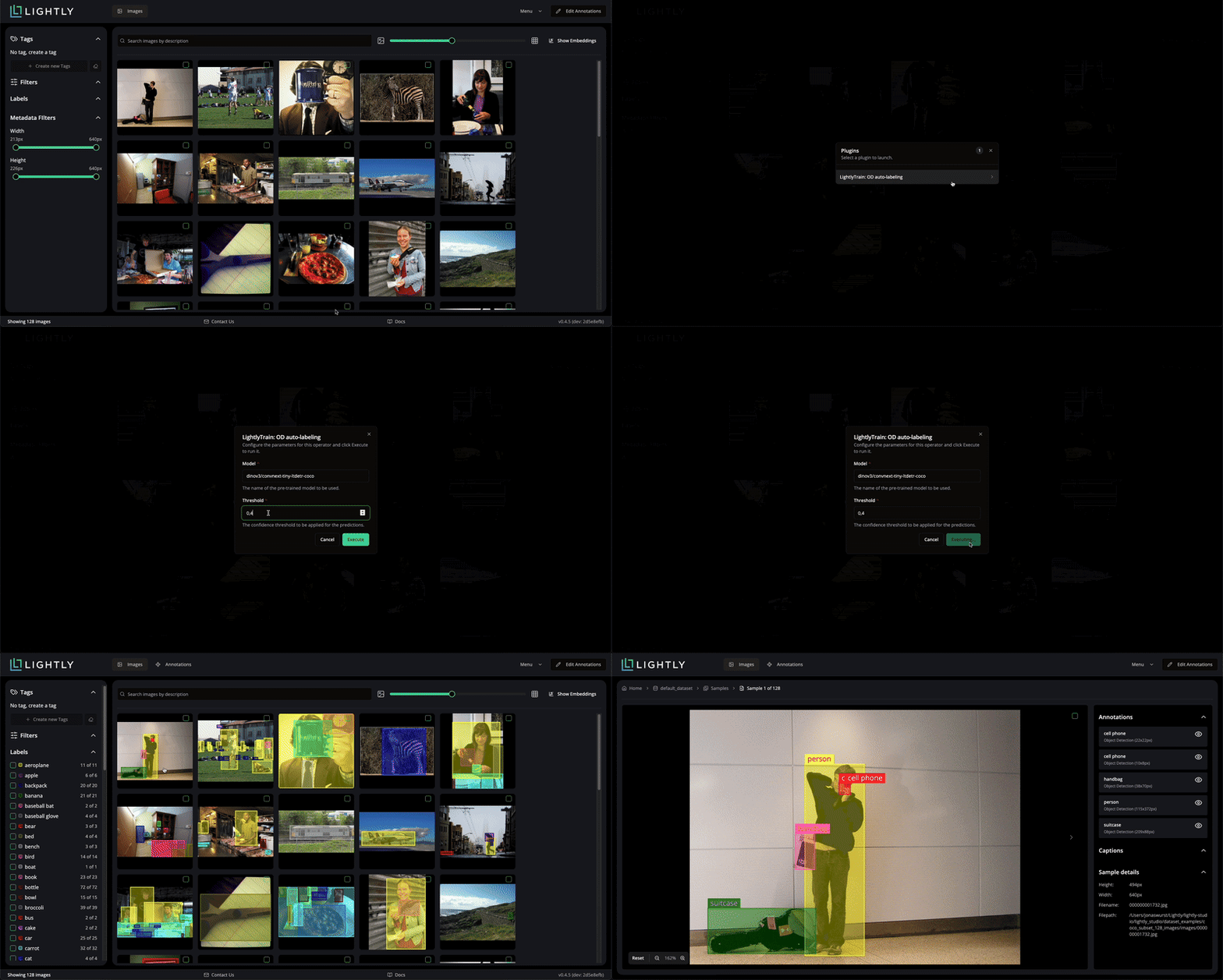
In this example we create an auto-labeling operator plugin powered by LightlyTrain, so make sure lightly-train is installed via pip install lightly-train. Compared to the Hello World example, this operator plugin introduces two inputs: the model name and the confidence threshold used for predictions. These parameters let you choose a pre-trained LightlyTrain model and control how confident detections must be before they are written back to LightlyStudio.
from dataclasses import dataclass

import lightly_train
from PIL import Image
from lightly_train._commands.predict_task_helpers import prepare_coco_entries as prepare_entries

from lightly_studio.models.annotation.annotation_base import AnnotationCreate, AnnotationType
from lightly_studio.models.annotation_label import AnnotationLabelCreate
from lightly_studio.plugins.base_operator import BaseOperator, OperatorResult
from lightly_studio.plugins.operator_context import OperatorScope
from lightly_studio.plugins.parameter import FloatParameter, StringParameter
from lightly_studio.resolvers.image_filter import ImageFilter
from lightly_studio.resolvers import annotation_label_resolver, annotation_resolver, image_resolver
from lightly_studio.resolvers.sample_resolver.sample_filter import SampleFilter


def _preload_label_map(session, dataset_id, class_names):
    """Pre-creates all necessary labels in the DB and returns a lookup map.

    Args:
        session: Database session.
        class_names: List of class names the model supports (e.g. ['car', 'person']).

    Returns:
        A dictionary mapping label names to their DB UUIDs.
    """
    label_map = {}

    for name in class_names:
        # Check if label exists in db
        label = annotation_label_resolver.get_by_label_name(session=session, dataset_id=dataset_id, label_name=name)

        # Create if missing
        if label is None:
            label_create = AnnotationLabelCreate(dataset_id=dataset_id, annotation_label_name=name)
            label = annotation_label_resolver.create(session=session, label=label_create)

        label_map[name] = label.annotation_label_id

    return label_map

@dataclass
class LightlyTrainAutoLabelingODOperator(BaseOperator):
    name: str = "LightlyTrain: OD auto-labeling"
    description: str = "This plugin allows to use pre-trained LightlyTrain models to perform auto-labeling for Object Detection."

    @property
    def parameters(self):
        return [
            StringParameter(
                name="Model",
                required=True,
                description="The name of the pre-trained model to be used.",
                default="dinov3/convnext-tiny-ltdetr-coco"
            ),
            FloatParameter(
                name="Threshold",
                default=0.4,
                description="The confidence threshold to be applied to the predictions."
            ),
        ]

    @property
    def supported_scopes(self) -> list[OperatorScope]:
        """Return the list of scopes this operator can be triggered from."""
        return [OperatorScope.IMAGE]

    def execute(self, *, session, context, parameters):
        model_name = parameters["Model"]
        try:
            model = lightly_train.load_model(model_name)
        except ValueError as e:
            return OperatorResult(success=False, message=f"Model load failed: {str(e)}")

        if (parameters["Threshold"] > 1.0) or (parameters["Threshold"] < 0.0):
            return OperatorResult(success=False, message="Threshold must be in range 0.0 to 1.0")

        collection_name = f"lightly_train_auto_label__{model_name}"
        raw_classes = getattr(model, "classes", {})
        label_map = _preload_label_map(session, context.collection_id, list(raw_classes.values()))

        # Getting all samples for the provided context
        context_filter = None
        if context.context_filter:
            if isinstance(context.context_filter, SampleFilter):
                context_filter = ImageFilter(sample_filter=context.context_filter)
            elif isinstance(context.context_filter, ImageFilter):
                context_filter = context.context_filter

        samples = image_resolver.get_all_by_collection_id(
            session=session,
            collection_id=context.collection_id,
            filters=context_filter
        )

        # Running inference
        annotations_buffer = []
        for sample in samples.samples:
            image = Image.open(sample.file_path_abs).convert("RGB")

            preds = model.predict(image, threshold=parameters["Threshold"])
            entries = prepare_entries(predictions=preds, image_size=(sample.width, sample.height))

            for entry in entries:
                annotations_buffer.append(
                    AnnotationCreate(
                        parent_sample_id=sample.sample_id,
                        annotation_label_id=label_map[raw_classes[entry["category_id"]]],
                        annotation_type=AnnotationType.OBJECT_DETECTION,
                        x=int(entry["bbox"][0]),
                        y=int(entry["bbox"][1]),
                        width=int(entry["bbox"][2]),
                        height=int(entry["bbox"][3]),
                        confidence=entry["score"],
                    )
                )

        annotation_resolver.create_many(
            session=session,
            parent_collection_id=context.collection_id,
            annotations=annotations_buffer,
            collection_name=collection_name,
        )
        total_created = len(annotations_buffer)

        return OperatorResult(
            success=True, message=f"Auto-labeling complete. Added {total_created} annotations."
        )
import lightly_studio as ls
from lightly_studio.plugins.operator_registry import operator_registry
from lightly_studio.utils import download_example_dataset
from lightly_train_auto_label_od_operator import LightlyTrainAutoLabelingODOperator

dataset_path = download_example_dataset(download_dir="dataset_examples")

dataset = ls.ImageDataset.create()
dataset.add_images_from_path(path=f"{dataset_path}/coco_subset_128_images/images")

# Register the operator to make it available to the application
operator_registry.register(LightlyTrainAutoLabelingODOperator())

ls.start_gui()
