Model Evaluation
Model evaluation runs let you compare model predictions against ground truth annotations and surface per-sample quality metrics in LightlyStudio. Supported task types are object detection, classification, instance segmentation and semantic segmentation.
For a hands-on, end-to-end walkthrough, follow the Evaluate YOLO26 on Your Dataset tutorial.
Model Evaluation in the GUI
Evaluation results are accessible in the Evaluation panel of the GUI once a run has been created via the Python API. Select an evaluation run in the Evaluation panel to inspect its configuration and confusion matrix. Then use the sample grid to drill into the underlying samples:
- Sort by
fp,fn, ortpfor object detection runs. - Sort by
disagreementfor classification runs. - Sort by
mioufor semantic segmentation. - Filter to the affected classes and inspect the hardest samples in detail view.
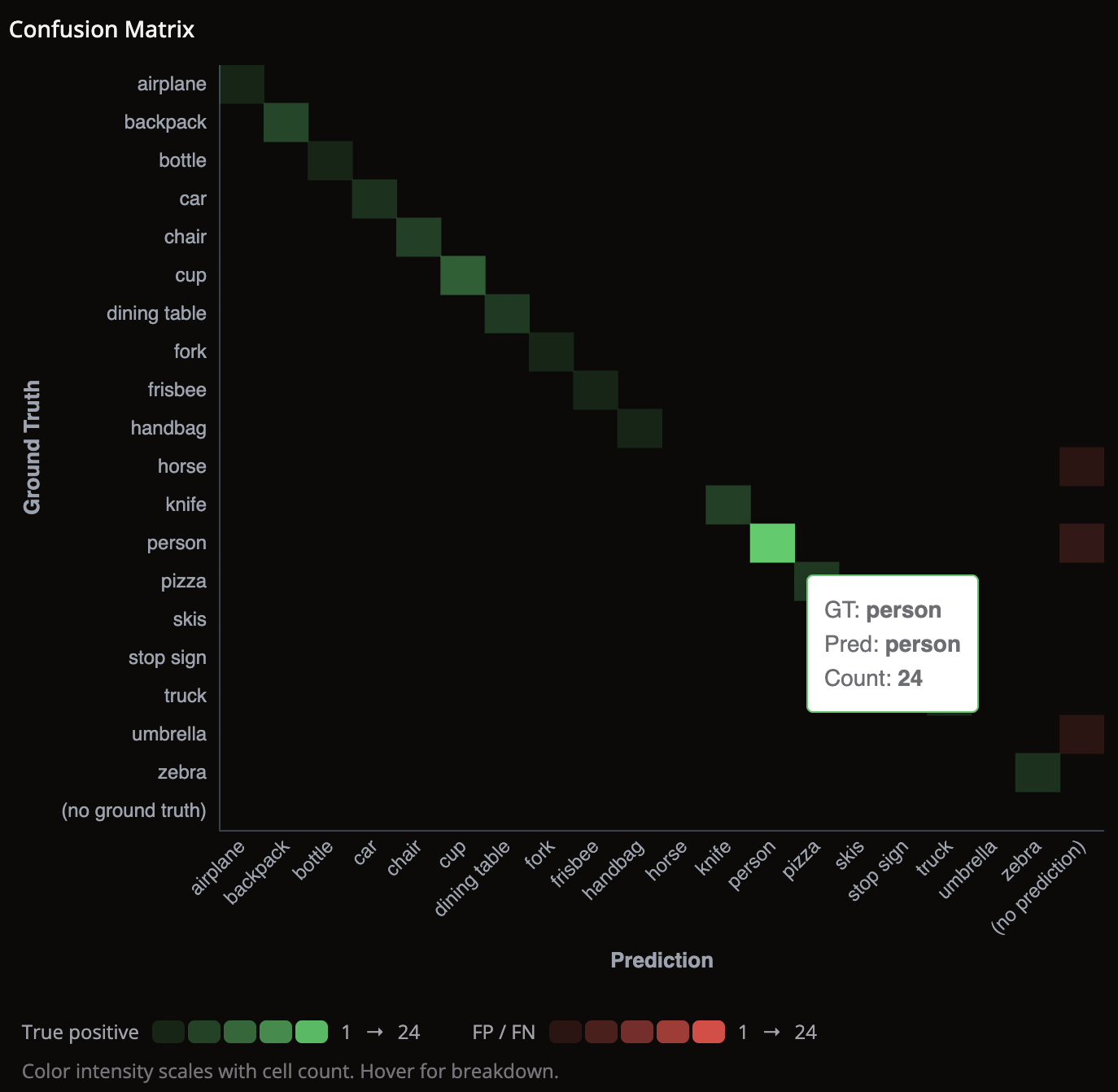
Reading the confusion matrix
- Color intensity reflects the number of samples in each cell.
- Green diagonal cells — the model predicts that class correctly.
- Red off-diagonal cells — the model is confusing those two classes.
- Use the red cells to decide which samples to inspect next in the grid.
Model Evaluation in Python
Creating an evaluation run
An evaluation run requires two annotation sources: one holding ground truth labels and one
holding model predictions. Use dataset.evaluate() to get the evaluation facade and then call the
task-specific method. Both return an EvaluationResult
summary.
import lightly_studio as ls
from lightly_studio.evaluation.image_dataset_evaluate import ObjectDetectionEvaluationConfig

IMAGES_PATH = "path/to/your/images/"
GROUND_TRUTH_JSON = "path/to/your/GT_annotations.json"
PREDICTIONS_JSON = "path/to/your/pred_annotations.json"

dataset = ls.ImageDataset.create()
dataset.add_images_from_path(path=IMAGES_PATH)
# Add ground truth annotations
dataset.add_annotations_from_coco(
    annotations_json=GROUND_TRUTH_JSON,
    images_root=IMAGES_PATH,
    annotation_source="ground_truth",
)
# Add prediction annotations
dataset.add_annotations_from_coco(
    annotations_json=PREDICTIONS_JSON,
    images_root=IMAGES_PATH,
    annotation_source="predictions",
)

config = ObjectDetectionEvaluationConfig(
    iou_threshold=0.5,  # minimum IoU to count a detection as a true positive
    classwise=True,     # match predictions only within the same annotation class
)

dataset.evaluate().object_detection(
    name="my-od-eval",
    gt_annotation_source="ground_truth",
    pred_annotation_source="predictions",
    config=config,
)

ls.start_gui()
Matching between predicted and ground truth boxes is based on intersection over union (IoU).
The iou_threshold in the configuration defines the minimum IoU required for a prediction and
a ground truth box to count as a match. Matched pairs contribute to true positives (tp),
while unmatched predictions and unmatched ground truth boxes contribute to false positives
(fp) and false negatives (fn).
The classwise setting controls whether matching is restricted to boxes with the same class
label. With classwise=True, a predicted dog box can only match a ground truth dog box.
Disable classwise if you want cross-class matches to populate the confusion matrix
off-diagonal, for example when a predicted dog is matched against a ground truth cat.
The resulting per-sample metrics are stored as tp, fp, and fn, which means you can sort
samples by the total number of true positives, false positives, or false negatives.
dataset.evaluate().classification(
    name="my-cls-eval",
    gt_annotation_source="ground_truth",
    pred_annotation_source="predictions",
)
Classification evaluation populates the confusion matrix directly from the ground truth and predicted labels.
Per-sample metric stored: disagreement in [0, 1]. It is calculated as 1 - confidence
when the labels match, and as confidence when the labels do not match. Higher values
indicate stronger disagreement between the ground truth and the prediction.
You can sort samples by disagreement to inspect the most uncertain correct predictions or the
most confident wrong predictions first.
from lightly_studio.evaluation.image_dataset_evaluate import (
    InstanceSegmentationEvaluationConfig,
)

config = InstanceSegmentationEvaluationConfig(
    iou_threshold=0.5,  # minimum mask IoU to count a prediction as a true positive
    classwise=True,     # match predictions only within the same annotation class
)

dataset.evaluate().instance_segmentation(
    name="my-insseg-eval",
    gt_annotation_source="ground_truth",
    pred_annotation_source="predictions",
    config=config,
)
Instance segmentation matches each predicted mask to a ground truth mask, using mask
intersection over union (IoU). The iou_threshold sets the minimum mask IoU for a match.
Matched pairs count as true positives (tp). Unmatched predictions count as false positives
(fp). Unmatched ground truth masks count as false negatives (fn).
Both the ground-truth and the prediction annotation source must contain segmentation-mask annotations, the same type semantic segmentation uses.
The classwise setting controls whether matching is restricted to masks with the same class
label. With classwise=True, a predicted dog mask can only match a ground truth dog mask.
With classwise=False, a prediction can match a ground truth of any class.
The per-sample metrics are stored as tp, fp, and fn. You can sort samples by the number
of true positives, false positives, or false negatives.
dataset.evaluate().semantic_segmentation(
    name="my-semseg-eval",
    gt_annotation_source="ground_truth",
    pred_annotation_source="predictions",
)
Semantic segmentation evaluation populates the confusion matrix from the per-pixel ground truth and predicted class labels.
Per-sample metric stored: miou (mean Intersection over Union). It is computed per image by
calculating the IoU for each class present in either the ground truth or the prediction, then
averaging those values across all classes. Higher values indicate better pixel-level agreement
between the ground truth mask and the predicted mask.
You can sort samples by miou to surface the images with the worst segmentation quality first.
Evaluating a subset of samples
Pass a DatasetQuery to evaluate() to restrict the run to a specific
set of samples — for example, a tagged validation split:
from lightly_studio.core.dataset_query import ImageSampleField

val_query = dataset.query().match(ImageSampleField.tags.contains("val"))

result = dataset.evaluate(query=val_query).object_detection(
    name="val-eval",
    gt_annotation_source="ground_truth",
    pred_annotation_source="predictions",
)
Only samples that appear in both annotation sources and in the query are included. Samples missing from either source are silently skipped.
Reading evaluation results
evaluate() also reads back the runs that were already stored. This lets a script assert model
quality without the GUI.
Use list_runs() to get the stored runs, newest first. Each run is an
EvaluationRunView with its id, name, configuration,
creation time, and source names. Use confusion_matrix() to get the confusion matrix of a run by
its id.
evaluator = dataset.evaluate()

runs = evaluator.list_runs()
for run in runs:
    print(run.name, run.created_at, run.evaluation_run_configuration)

matrix = evaluator.confusion_matrix(run_id=runs[0].id)
print(matrix.row_labels, matrix.col_labels, matrix.counts)
Use metrics() to get aggregate metrics of a run. It returns per-class and micro-averaged
precision, recall, and F1, plus accuracy for classification runs.
metrics = evaluator.metrics(run_id=runs[0].id)
print(metrics.precision, metrics.recall, metrics.f1, metrics.accuracy)
for entry in metrics.per_class:
    print(entry.label, entry.precision, entry.recall, entry.f1, entry.support)
confusion_matrix() and metrics() support object-detection and classification runs. They do not
support segmentation runs.
See Evaluation API Reference for the full API surface.
